ROS 2 Humble to Jazzy Migration Guide for IsaacLab UR Reach
Mar 10, 2026·12 min read
docs
Overview
This guide details the modifications suggested for the isaaclab_ur_reach_sim2real codebase to migrate from ROS 2 Humble (Ubuntu 22.04) to ROS 2 Jazzy Jalisco (Ubuntu 24.04).
In addition to syntax and API changes, it covers the environmental configuration tweaks needed to successfully run the task scripts from a separate terminal containing virtual environments (e.g., PyTorch or IsaacLab).
1. Codebase Syntax and API Changes
Updating Controller State Topics
Between ROS 2 Humble and Jazzy, the default controller state topic for the scaled joint trajectory controller changed.
In python/run_task.py, the STATE_TOPIC must be updated:
# Old (ROS 2 Humble)STATE_TOPIC='/scaled_joint_trajectory_controller/state'# New (ROS 2 Jazzy)STATE_TOPIC='/scaled_joint_trajectory_controller/controller_state'
Adapting to control_msgs Changes
The JointTrajectoryControllerState message definition changed in ROS 2 Jazzy. The actual field was deprecated and renamed to feedback.
In python/run_task.py, inside the sub_callback function, update the attributes used to access joint positions and velocities:
# Old (ROS 2 Humble)joint_pos=msg.actual.positions[i]self.robot.update_joint_state(msg.actual.positions,msg.actual.velocities)# New (ROS 2 Jazzy)joint_pos=msg.feedback.positions[i]self.robot.update_joint_state(msg.feedback.positions,msg.feedback.velocities)
2. Hardcoded Configuration Paths
The pre-trained policy loader uses hardcoded paths to initialize the model and environment parameters. These need to be updated to match the local workspace structure on the new machine.
In python/robots/ur.py:
# Update these to match your local repository clone pathself.load_policy("/home/<YOUR_USER>/isaaclab_ur_reach_sim2real/sample/ur_reach/ur_reach_policy.pt","/home/<YOUR_USER>/isaaclab_ur_reach_sim2real/sample/ur_reach/ur_reach_env.yaml",)
3. Environment and Terminal Setup
To run the task scripts from another terminal successfully, you must handle Python dependencies and the integration between deep learning environments (venv/conda) and the ROS 2 workspace.
Dependencies
Create a virtual environment and load the necessary dependencies (torch, torchvision, torchaudio, numpy, pyyaml).
When running within an isolated virtual environment (like a conda env for IsaacLab or a venv for PyTorch), the ROS 2 Python packages might not be correctly recognized even after sourcing the setup file.
To allow task scripts to run seamlessly from another terminal, source ROS 2 Jazzy and explicitly append its site-packages to your PYTHONPATH:
# Sourcing ROS 2 Jazzysource /opt/ros/jazzy/setup.bash
# Ensure Python 3.12 (the default for Ubuntu 24.04/Jazzy) sees the ROS 2 packagesexportPYTHONPATH=$PYTHONPATH:/opt/ros/jazzy/lib/python3.12/site-packages
# Navigate and run your taskcd /path/to/isaaclab_ur_reach_sim2real/python/
python3 run_task.py
This ensures standard tools like rclpy are successfully imported within your deep learning environment.
4. Visual Guide to Sim2Sim Setup in URSim
Running the simulation using URSim? Here is a step-by-step visual process:
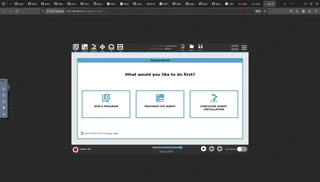
1. Launch URSim
After launching URSim using the ur_robot_driver scripts, open it in your VNC browser interface. You should see an interface similar to:
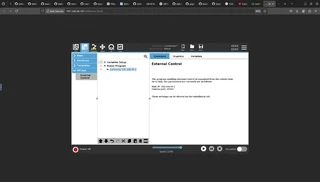
2. Activate External Control in URCaps
In the Programs tab, below URCaps, click on External Control. Below Robot Progam you should see appear indicating the host IP properly.
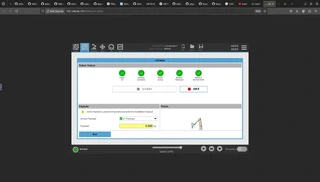
3. Start the UR Robot
Click on the red button in the bottom left. Click on On, then Start until you obtain the following interface indicating the robot is operational:
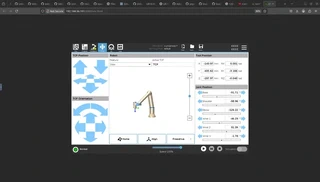
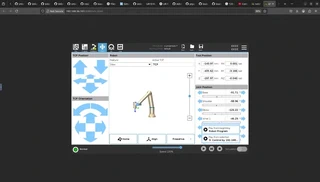
4. Proceed to Move Tab
Press Exit, and then switch over to the Move tab in the interface:
5. Connect to Computer
Press the play button in the bottom and select the generated connection profile to effectively prepare for accepting commands!
About the Author
I am Pouya Shaterzadeh. My work involves using open-source tools to build end-to-end robotics and deep learning software!
word word word word word word word word word word word word word word word word word word word word
word word word word word word word word word word word word word word word word word word word word
word word word word word word word word word word word word word word word word word word word word
word word word word word word word word word word word word word word word word word word word word
word word word word word word word word word word word word word word word word word word word word
word word word word word word word word word word word word word word word word word word word word
word word word word word word word word word word word word word word word word word word word word
word word word word word word word word word word word word word word word word word word word word
word word word word word word word word word word word word word word word word word word word word
word word word word word word word word word word word word word word word word word word word word
word word word word word word word word word word word word word word word word word word word word
word word word word word word word word word word word word word word word word word word word word
word word word word word word word word word word word word word word word word word word word word
word word word word word word word word word word word word word word word word word word word word
word word word word word word word word word word word word word word word word word word word word
word word word word word word word word word word word word word word word word word word word word
word word word word word word word word word word word word word word word word word word word word
word word word word word word word word word word word word word word word word word word word word
word word word word word word word word word word word word word word word word word word word word
word word word word word word word word word word word word word word word word word word word word
word word word word word word word word word word word word word word word word word word word word
word word word word word word word word word word word word word word word word word word word word
word word word word word word word word word word word word word word word word word word word word
word word word word word word word word word word word word word word word word word word word word
word word word word word word word word word word word word word word word word word word word word
word word word word word word word word word word word word word word word word word word word word
word word word word word word word word word word word word word word word word word word word word
word word word word word word word word word word word word word word word word word word word word
word word word word word word word word word word word word word word word word word word word word
word word word word word word word word word word word word word word word word word word word word
word word word word word word word word word word word word word word word word word word word word
word word word word word word word word word word word word word word word word word word word word
word word word word word word word word word word word word word word word word word word word word
word word word word word word word word word word word word word word word word word word word word
word word word word word word word word word word word word word word word word word word word word
word word word word word word word word word word word word word word word word word word word word
word word word word word word word word word word word word word word word word word word word word
word word word word word word word word word word word word word word word word word word word word
word word word word word word word word word word word word word word word word word word word word
word word word word word word word word word word word word word word word word word word word word
word word word word word word word word word word word word word word word word word word word word
word word word word word word word word word word word word word word word word word word word word
word word word word word word word word word word word word word word word word word word word word
word word word word word word word word word word word word word word word word word word word word
word word word word word word word word word word word word word word word word word word word word
word word word word word word word word word word word word word word word word word word word word
word word word word word word word word word word word word word word word word word word word word
word word word word word word word word word word word word word word word word word word word word
word word word word word word word word word word word word word word word word word word word word
word word word word word word word word word word word word word word word word word word word word
word word word word word word word word word word word word word word word word word word word word
word word word word word word word word word word word word word word word word word word word word
word word word word word word word word word word word word word word word word word word word word
word word word word word word word word word word word word word word word word word word word word
word word word word word word word word word word word word word word word word word word word word
word word word word word word word word word word word word word word word word word word word word
word word word word word word word word word word word word word word word word word word word word
word word word word word word word word word word word word word word word word word word word word
word word word word word word word word word word word word word word word word word word word word
word word word word word word word word word word word word word word word word word word word word
word word word word word word word word word word word word word word word word word word word word
word word word word word word word word word word word word word word word word word word word word
word word word word word word word word word word word word word word word word word word word word
word word word word word word word word word word word word word word word word word word word word
word word word word word word word word word word word word word word word word word word word word
word word word word word word word word word word word word word word word word word word word word
word word word word word word word word word word word word word word word word word word word word
word word word word word word word word word word word word word word word word word word word word
word word word word word word word word word word word word word word word word word word word word
word word word word word word word word word word word word word word word word word word word word
word word word word word word word word word word word word word word word word word word word word
word word word word word word word word word word word word word word word word word word word word
word word word word word word word word word word word word word word word word word word word word
word word word word word word word word word word word word word word word word word word word word
word word word word word word word word word word word word word word word word word word word word
word word word word word word word word word word word word word word word word word word word word
word word word word word word word word word word word word word word word word word word word word
word word word word word word word word word word word word word word word word word word word word
word word word word word word word word word word word word word word word word word word word word
word word word word word word word word word word word word word word word word word word word word
word word word word word word word word word word word word word word word word word word word word
word word word word word word word word word word word word word word word word word word word word
word word word word word word word word word word word word word word word word word word word word
word word word word word word word word word word word word word word word word word word word word
word word word word word word word word word word word word word word word word word word word word
word word word word word word word word word word word word word word word word word word word word
word word word word word word word word word word word word word word word word word word word word
word word word word word word word word word word word word word word word word word word word word
word word word word word word word word word word word word word word word word word word word word
word word word word word word word word word word word word word word word word word word word word
word word word word word word word word word word word word word word word word word word word word
word word word word word word word word word word word word word word word word word word word word
word word word word word word word word word word word word word word word word word word word word
word word word word word word word word word word word word word word word word word word word word
word word word word word word word word word word word word word word word word word word word word
word word word word word word word word word word word word word word word word word word word word
word word word word word word word word word word word word word word word word word word word word
word word word word word word word word word word word word word word word word word word word word
word word word word word word word word word word word word word word word word word word word word
word word word word word word word word word word word word word word word word word word word word